
Ortho Pivot — new One Click Tools plugin, fancy a feature?
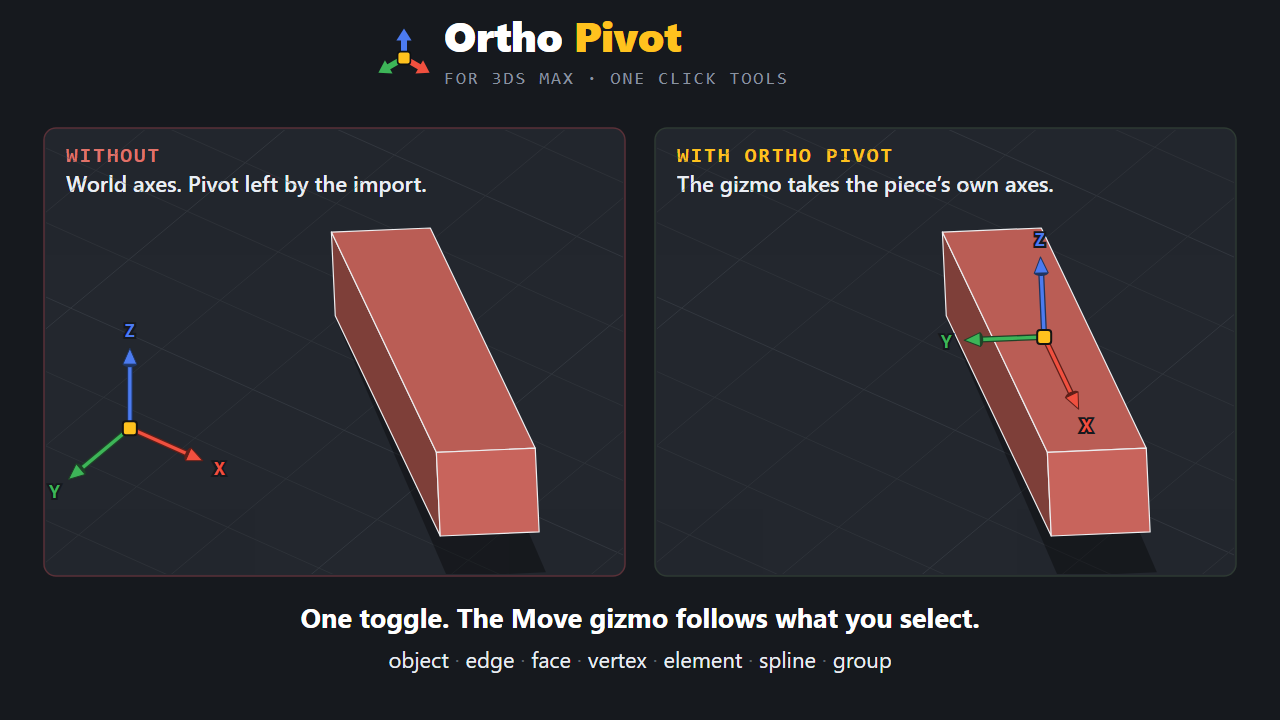
Ortho Pivot: the Move gizmo follows whatever you select, on its own axes.
Almost nothing you model sits on the world grid. A wall at 23 degrees, a beam on a slope, a CAD import. You press W and 3ds Max hands you X, Y and Z, and not one of them is the direction you want to move the thing in. So you orbit the view and drag hopefully, or set up a working plane, or use Affect Pivot Only and hope you put it back.
Ortho Pivot removes all of that. Turn it on once and the Move gizmo takes the axes of whatever you have selected: object, face, edge, vertex, element, spline, plus cameras, lights and helpers on their local axes. Click the same edge or vertex again to cycle to the other sensible orientation. On a face, Z becomes the normal, so you slide inside the plane whatever its tilt. On a spline end knot, the axis runs along its line, so you extend an extremity straight out.
It only drives the Working Pivot, so your real object pivot is never modified: switch it off and the scene is exactly as you left it. Axis detection runs in milliseconds even on heavy CAD imports, and while it is on your selection turns blue in the viewport. That is the entire interface, there is no panel and nothing to configure.
3ds Max 2021 and newer, tested on 2024 to 2027, renderer agnostic. Drag the .mzp into a viewport to install, one-click uninstall included.
Thanks again for the previous features, they made a real difference. Tell me if you need another format or resolution.